Bulk WhatsApp messages, personal to every customer
Pick who hears it, write it once, and each person gets their own message.


- Used by sales teams in India, the UAE, Singapore, Australia and Brazil
- Free plan
- No card needed
Who, what and when
- 01
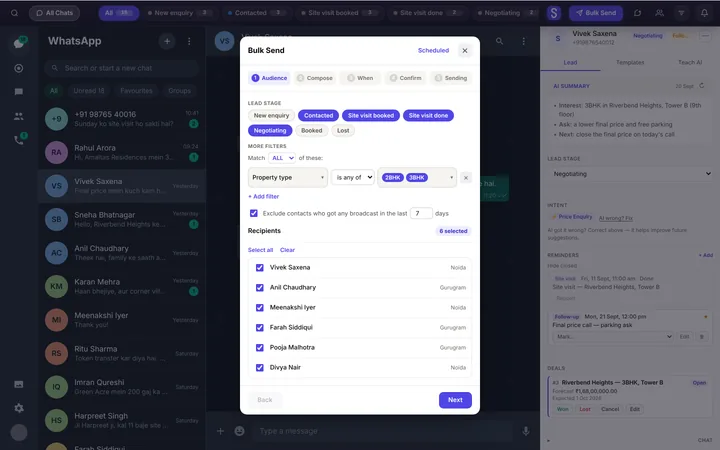
Who
Filter by stage, deal stage or any field you keep.
- 02
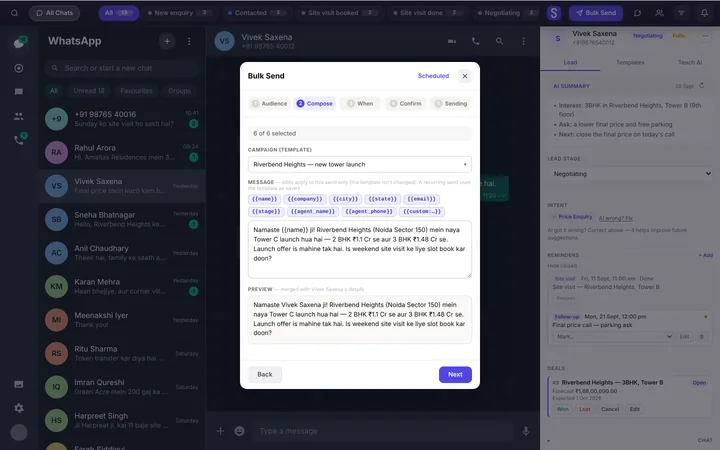
What
A template with merge fields, edited for this send if you like.
- 03
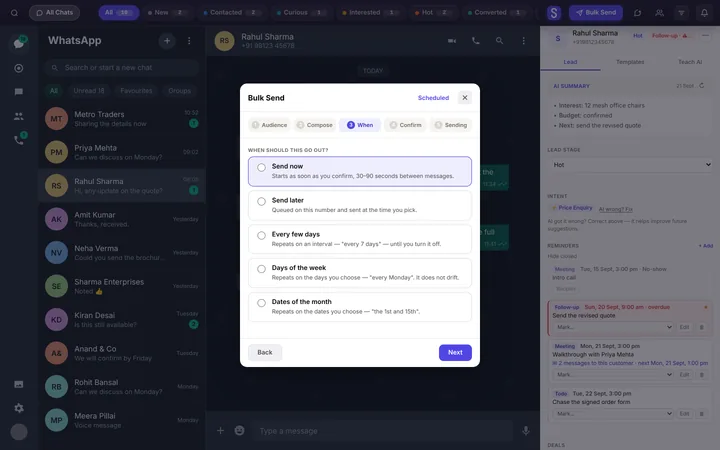
When
Now, later, or on a schedule that repeats.
- 04
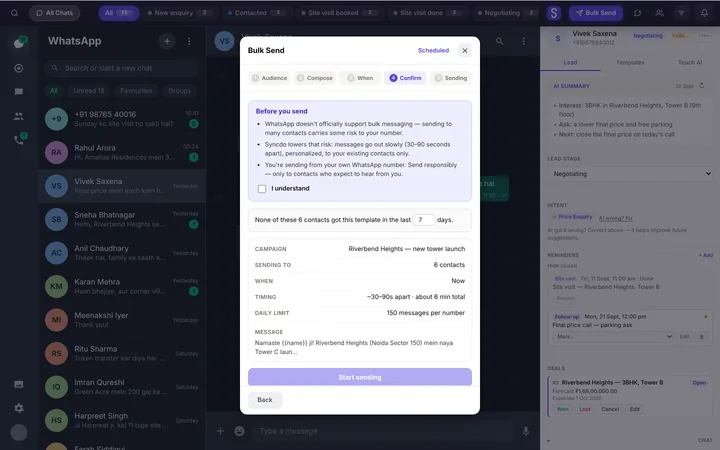
Safe by default
Skips anyone messaged recently, and anyone who replies.
For the owner
Campaigns lists what's queued; cancel a whole send at once.
Paced like a person, because it is one
Each message goes from your own WhatsApp Web, one at a time, filled in for that person.
- A random 30–90 seconds between messages.
- A longer pause after every 25 to 35.
- At most 150 a day from each number.
- Sends only while WhatsApp Web is open.

Follow-up that keeps going
A cadence repeats on a schedule. A sequence is a short series that ends, and stops when they reply.
- Every few days, chosen weekdays, or dates of the month.
- Inside your send window: 9am to 6pm unless you change it.
- Stop after a set number of unanswered messages.

Built to keep your number healthy
Your own customers
Send to leads you already have.
One at a time
Paced like a person, up to 150 a day per number.
People who expect you
Message customers who know you and expect to hear from you.
Use an established number with real conversations, and message people who expect you.
Questions, answered
What is bulk WhatsApp messaging?
It's sending one message to many people at once. Syncdo does it one chat at a time from your own WhatsApp, each message filled in for that person.
Will my number get banned?
No tool can promise that. Syncdo sends one message at a time, at a person's pace, capped per number.
Is there a per-message fee?
No. Messages go from your own WhatsApp Web, so there's no API and no per-message charge.
Can I personalise each message?
Yes. Merge fields fill in each person's name and details, and spintax varies the wording.
Can I attach a PDF or image?
Yes. A template's files go with every message in the send.
How many can I send a day?
At most 150 from each number, and one send takes at most 150. The rest wait for a later send.
Can I schedule it for later?
Yes. It sends at that time if WhatsApp Web is open, and expires 24 hours after it.
Can I stop a send halfway?
Yes. Stop a batch partway and retry the ones that failed; Campaigns cancels anything still queued.
Does it send at night?
Cadences and sequences send only inside your send window, 9am to 6pm unless you change it.
Which plan do I need?
Essentials or Intelligence. Bulk send is on both paid plans.