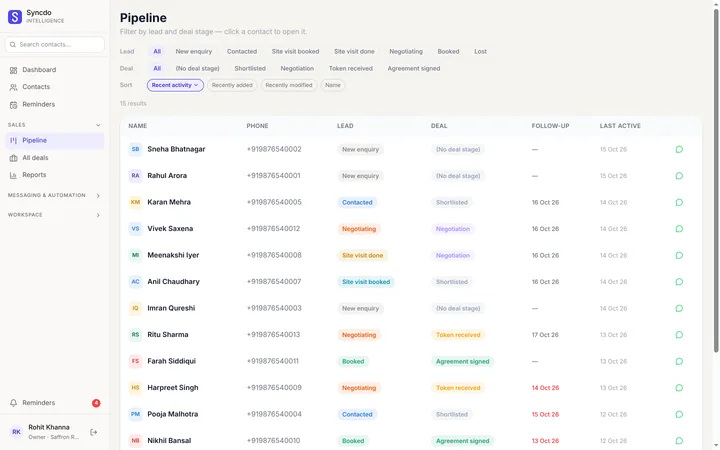
Your whole sales pipeline, in one view
Every lead and deal by stage — moved from the chat, the phone or the dashboard.

- Used by sales teams in India, the UAE, Singapore, Australia and Brazil
- Free plan
- No card needed
Each person sees their own
Reps
Only the leads assigned to them, by default.
Managers
Their own leads, or everyone's if you allow it.
Owners and admins
Every lead, and who it belongs to.
One pipeline
In WhatsApp Web
Stage chips across the top; tap one to filter the list.

On the dashboard
Leads by lead stage and deal stage, for the whole team.

Saved filters
Save one in the panel; it's on the dashboard too.

Full history
Every stage change, with who made it and when.
Move a lead without leaving the chat
Open a chat and the lead sits beside it: stage, fields, notes and history. Change the stage there; it saves as you go.
- Default stages on Free; your own on paid plans.
- Your own fields: city, budget, product, anything.
- Renaming a stage keeps every lead on it.
- Deleting a stage asks where its leads go.
Questions, answered
What is a sales pipeline?
It's every lead sorted by where they are, from new enquiry to won or lost. Syncdo shows it inside WhatsApp Web, so the stage sits beside each chat.
Can I use my own pipeline stages?
Yes, on Essentials and Intelligence. Free uses the default stages and fields.
What happens to leads when I rename or delete a stage?
Renaming keeps every lead on it. Deleting asks where its leads should go before the stage disappears.
Does opening a chat add it as a lead?
No. A chat becomes a lead only when you add it, and group chats are never picked up.
Can I see the pipeline on my phone?
Yes. The dashboard works on any phone.
I'm moving from another CRM or a spreadsheet. How?
Export a CSV or share a Google Sheet. Syncdo maps the columns and brings your leads in, with their stages.