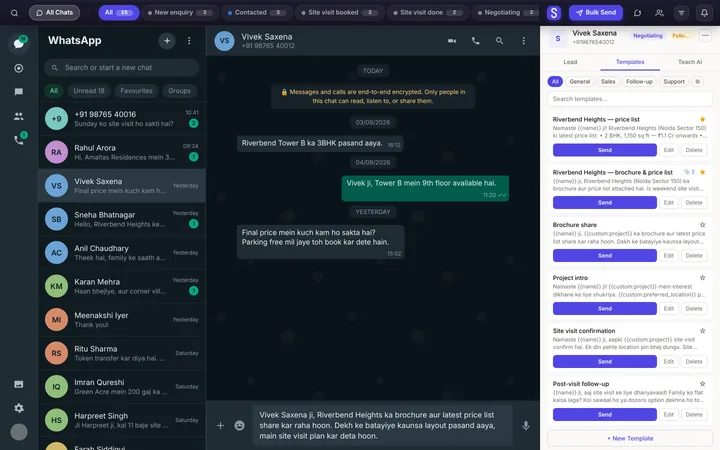
WhatsApp templates with your brochure attached
Your best replies, filled in for each customer, sent in one click.

- Used by sales teams in India, the UAE, Singapore, Australia and Brazil
- Free plan
- No card needed
One library, beside the chat and on the phone
Beside the chat
Pick one on the Templates tab; the details fill in.

On the phone
From the lead, tap WhatsApp and pick a text template.
Up to 10 attachments
PDFs, photos and price lists, up to 10MB each.
Merge fields
Name, company, city, stage and your own fields.
Your categories
Chips above the list keep a long library usable.

For the owner
Templates belong to the workspace: one wording for every rep.

Brochure and price list in one click
From the panel, the files and the text arrive as one WhatsApp message, with the text as the caption.
- A template can be just a file: PDF, photo or voice note.
- Change the words for one customer; the saved template stays.
- Two or three suggested for each chat, on Intelligence.
No approval, no API
These are your own saved messages, sent in normal chats. Nothing waits for Meta to approve it.
- Spintax by hand on every plan, so your messages vary.

Start with three. Grow to unlimited.
Free holds 3 saved templates; Essentials and Intelligence have no limit. On Free, messages end with a short "Sent via Syncdo" line.
Questions, answered
What is a WhatsApp template?
It's a saved message you send again and again, with each customer's details filled in. In Syncdo it can carry files, and it needs no approval from Meta.
Can I attach files to a template?
Yes. Up to 10 per template, each up to 10MB: a catalogue PDF, photos or a price list.
Can I send a template from my phone?
Yes, text templates: pick one on the lead and you see the finished message before WhatsApp opens. Templates with files go from WhatsApp Web.
How many templates can I save?
Three on the free plan, unlimited on Essentials and Intelligence. Your library starts empty: templates are the replies you save.
Can a template leave a blank for me?
Yes. Type ___ where you'll fill in a price or date each time; Syncdo leaves it alone.
Can I organise templates?
Yes, in your own categories, shown as chips above the list. Search reads names and message text.
Do templates need WhatsApp's approval?
No. They're your own messages, sent in normal chats from your own number.
Where do I create them?
On the Templates tab beside a chat in WhatsApp Web. The dashboard lists them and can send them.